
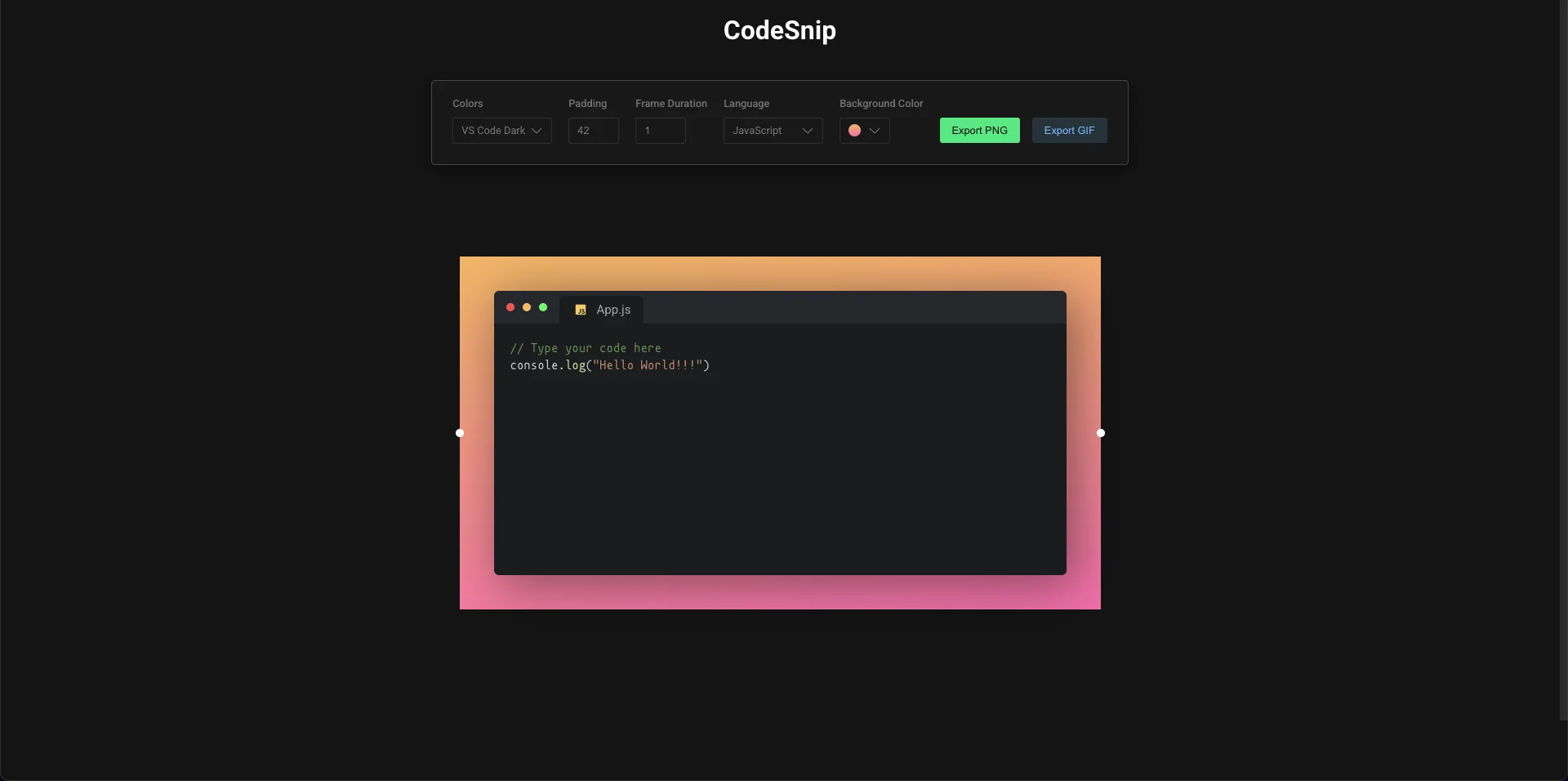
Sharing a code snippet on social media or in a slide deck usually means an ugly plain-text screenshot. Tools like carbon.now.sh solved that by rendering code into a styled "window" and exporting it as an image - CodeSnip is a from-scratch take on the same idea, plus an animated-GIF export that doesn't use a canned animation at all: it replays your actual typing, frame by frame.
Architecture
flowchart TD

subgraph group_state["Root state"]
  node_app["App.js
editor + theme + GIF export state
[src/App.js]"]
end

subgraph group_render["Rendering layer"]
  node_background["Background
export target, resize handles
[src/components/Background/index.js]"]
  node_window["Window
title bar, filename, editor
[src/components/Background/Window/Window.jsx]"]
  node_editor["react-simple-code-editor
editable code area"]
  node_theme_css["Theme stylesheet
swapped via link tag, not CSS-in-JS
[public/themes/*.css]"]
end

subgraph group_gif["GIF export - 4 chained useEffects"]
  node_onrecord["onRecord()
builds one frame per character typed
[src/App.js]"]
  node_frame_advance["Advance currentFrameToCapture
useEffect 1"]
  node_frame_render["Push frame text into editorState
useEffect 2"]
  node_snapshot["takeSnapshot()
scale 1.9x, useEffect 3
[src/App.js]"]
  node_pad["Pad with 9 copies of last frame
useEffect 4"]
end

subgraph group_external["External libraries"]
  node_prism{{"Prism
syntax highlighting"}}
  node_dom_to_image{{"dom-to-image-more
DOM to PNG capture"}}
  node_gifshot{{"gifshot
client-side GIF encoder"}}
end

node_download["downloadBlob()
off-DOM anchor click, save-as
[src/lib/downloadBlob.ts]"]

node_app -->|"renders"| node_background
node_background -->|"composes"| node_window
node_window -->|"wraps"| node_editor
node_editor -->|"highlights via"| node_prism
node_window -.->|"swaps href on theme change"| node_theme_css
node_app -->|"PNG export"| node_dom_to_image
node_dom_to_image -->|"toPng data URL"| node_download
node_app -->|"onRecord() triggers"| node_onrecord
node_onrecord -->|"exportingGIF = true"| node_frame_advance
node_frame_advance -->|"next frame index"| node_frame_render
node_frame_render -->|"re-renders editor"| node_snapshot
node_snapshot -->|"captures via"| node_dom_to_image
node_dom_to_image -->|"accumulates gifFrames"| node_pad
node_pad -->|"encodes"| node_gifshot
node_gifshot -->|"animated GIF blob"| node_download

click node_app "https://github.com/manish-9245/codesnip/blob/main/src/App.js"
click node_onrecord "https://github.com/manish-9245/codesnip/blob/main/src/App.js"
click node_snapshot "https://github.com/manish-9245/codesnip/blob/main/src/App.js"
click node_background "https://github.com/manish-9245/codesnip/blob/main/src/components/Background/index.js"
click node_window "https://github.com/manish-9245/codesnip/blob/main/src/components/Background/Window/Window.jsx"
click node_download "https://github.com/manish-9245/codesnip/blob/main/src/lib/downloadBlob.ts"

classDef toneNeutral fill:#f8fafc,stroke:#334155,stroke-width:1.5px,color:#0f172a
classDef toneBlue fill:#dbeafe,stroke:#2563eb,stroke-width:1.5px,color:#172554
classDef toneAmber fill:#fef3c7,stroke:#d97706,stroke-width:1.5px,color:#78350f
classDef toneMint fill:#dcfce7,stroke:#16a34a,stroke-width:1.5px,color:#14532d
classDef toneRose fill:#ffe4e6,stroke:#e11d48,stroke-width:1.5px,color:#881337
classDef toneIndigo fill:#e0e7ff,stroke:#4f46e5,stroke-width:1.5px,color:#312e81
classDef toneTeal fill:#ccfbf1,stroke:#0f766e,stroke-width:1.5px,color:#134e4a
class node_app toneNeutral
class node_background,node_window,node_editor,node_theme_css toneBlue
class node_onrecord,node_frame_advance,node_frame_render,node_snapshot,node_pad toneAmber
class node_prism,node_dom_to_image,node_gifshot toneIndigo
class node_download toneMint
Boxes are clickable and jump straight to the real source file on GitHub.
The typing animation is not a canned effect
The clever part of CodeSnip isn't the PNG export - that's a straightforward DOM-to-image capture. It's the GIF: instead of animating a pre-made effect over the finished code, it reconstructs the history of you typing it, one character at a time, and screenshots every step:
// src/App.js - building one frame per character typed
const onRecord = () => {
  const totalLines = editorState.split('').filter((c) => c === '\n').length;
  let linesLeft = totalLines;
  let tempFrames = [];
  for (let i = 0; i < editorState.length; i++) {
    if (editorState[i] === '\n') linesLeft--;
    let currentFrame = editorState.slice(0, i + 1);
    for (let j = 0; j < linesLeft; j++) currentFrame += '\n';
    tempFrames.push(currentFrame);
  }
  setFrames(tempFrames);
  setExportingGIF(true);
};
Each entry in tempFrames is the snippet truncated to i characters, padded with the remaining newlines so the code block doesn't visually collapse as lines "disappear" mid-animation. For a 200-character snippet, that's 200 separate frames - and every one of them gets rendered and screenshotted before encoding even starts.
A state machine made of four useEffects
Rather than one async function driving the export start-to-finish, GIF export is spread across four chained useEffect hooks in App.js - one advances currentFrameToCapture, one pushes each frame's text into editorState so it re-renders, one calls takeSnapshot() via dom-to-image-more's domtoimage.toPng and accumulates results into gifFrames, and a final one fires once every frame is captured and hands the whole array to gifshot.createGIF(). It works, but the file's own top comment is disarmingly honest about it: // This needs refactoring and // TODO: Refactor this to use context API - a real admission of the tech debt sitting in the code, not something inferred from the outside.
One deliberate finishing touch: before encoding, the frame list gets padded with nine repeated copies of the final frame:
for (let i = 0; i < 9; i++) {
  framesToExport.push(gifFrames[gifFrames.length - 1]);
}
Without that, the GIF would loop back to frame one the instant typing finished. Nine extra identical frames buy a visible pause on the completed code before it loops - a small trick, but it's the difference between a GIF that reads as "here's the finished snippet" and one that just looks broken.
The real cost of this approach
Because export re-renders and screenshots the DOM once per character, the whole pipeline is inherently serial and slow for longer snippets - a 200-character example means 200 full dom-to-image captures (each scaled 1.9x for resolution) running one after another through those four effects before gifshot even starts encoding. That's a real, visible lag on anything beyond a short snippet, and it's the direct cost of the "replay real keystrokes" approach instead of a pre-baked animation. It's a legitimate trade for a hobby export tool: simpler to reason about than a proper animation timeline, at the cost of scaling linearly with snippet length.
Everything else is DOM tricks, not magic
The theme system is refreshingly low-tech: Window.jsx swaps a <link href="/themes/${theme}.css"> tag's href rather than reaching for CSS-in-JS, so a "theme" is just a static stylesheet in public/themes/ being hot-swapped. Downloading the final PNG is nine lines - build an off-DOM <a download>, click it, remove it. And the syntax highlighter (Prism, via react-simple-code-editor) supports nineteen languages, noticeably more than the five IDE color themes on offer - a small asymmetry worth knowing if "customization" is the feature you're evaluating it for.
Running it
git clone https://github.com/manish-9245/codesnip
cd codesnip && npm install && npm start